Sep 12, 2018 (updated: May 2, 2020) | Cab Grid Pro, Help and Support
Cab Grid Pro v5 provides a template that allows the taxi price calculator or taxi price table to be embedded in another website or application such as Facebook. This article describes the steps to generate the Cab Grid Pro embed page.
Sep 8, 2018 (updated: September 9, 2018) | Cab Grid Pro, Help and Support
Cab Grid Pro 5 introduces the ability to combine calculation modes. This is useful where the choice of vehicle should be offered (rather than determined by the system).
Modes are combined by adding comma-separated values to the layout attribute of the Cab Grid Pro shortcode as follows. At this time, the only possible combinations are Vehicle and Time layout, and Vehicle and Ticket layout.
Sep 7, 2018 (updated: February 12, 2023) | Cab Grid Pro, Help and Support
Location and price data can be imported to Cab Grid Pro from an external source (CSV file). This can be especially useful if there are large number of places and prices.
Sep 7, 2018 (updated: September 8, 2021) | Cab Grid Pro, Help and Support
The cabGridProTable shortcode displays a price table as opposed to the regular CabGrid Pro price calculator. Prices and table attributes can be controlled through attributes defined as part of the shortcode (or in the Gutenburg block). These include captions, vehicles, groups, links, destinations and more.
Sep 6, 2018 (updated: September 19, 2020) | Cab Grid Pro, Custom Styles, Help and Support
CabGrid Pro version 5.0 provides the ability to select the main stylesheet loaded with the front-end calculator plugin. There are a variety of pre-defined style-sheets available that provide a starting point for any custom CSS.
Sep 5, 2018 (updated: December 23, 2018) | Cab Grid Pro, Help and Support, Tutorial Videos
A WordPress website provides the ability for individual users to log in and perform actions on the site, such as commenting on posts or editing pages. Most websites will have only one user – the administrator – but others can be added (or registered). Any...
Sep 1, 2018 (updated: July 25, 2020) | Cab Grid Pro, Help and Support, Troubleshooting
CabGrid Pro v5.6 and above is transitioning away from the URL rewrite technique previously in use. In general, for versions higher than this, it is recommended to turn friendly URLs off. Cab Grid Pro v5 makes use of URL rewrite functionality to present more...
Sep 1, 2018 (updated: August 25, 2024) | Cab Grid Pro, Help and Support, Troubleshooting
In some circumstances, email messages sent from CabGrid (WordPress) can not get through. There are a number of reasons for this. This article attempts to address some common email deliverability issues.
Aug 30, 2018 (updated: January 14, 2024) | Cab Grid Pro, Help and Support, Tutorial Videos
How to configure Cab Grid Pro version 5 (or higher) and Twilio to send SMS text messages in various circumstances, including booking requests, confirmation or cancellation messages, and more.
Aug 24, 2018 (updated: May 21, 2022) | Booking Management, Help and Support
Automatically remind customers about upcoming bookings via SMS text message or email with the Booking Management Add-on v2.2. Schedule up to two reminders to be sent ahead of both pick-up and return journeys.
Aug 3, 2018 (updated: August 14, 2019) | Help and Support
This article examines Gutenberg’s impact on the Cab Grid price calculator plugin for WordPress. At this time, it appears that Cab Grid functionality remains unaffected…
Jul 27, 2018 (updated: May 17, 2025) | Cab Grid Pro, Help and Support
Cab Grid Pro version 5 is out!
List of key new features in version 5.0 of the Cab Grid Pro taxi price calculator plugin for WordPress websites.
– Individual discounts can be applied to WordPress user accounts.
– Customer advised of booking availability.
– Grant access to Cab Grid Pro admin for other roles and users.
– Multiple discount codes.
– Date picker for blocked out dates.
Jul 24, 2018 (updated: May 15, 2019) | Cab Grid Pro, Help and Support
Prices calculated by Cab Grid Pro can be discounted (or modified) by providing promotional coupon or discount codes, or by implementing price variation formulas. This article lists the various methods available (or coming soon).
Jul 24, 2018 (updated: August 29, 2018) | Booking Management, Cab Grid Pro, Cab Grid Pro Stripe Integration, Help and Support
How to manipulate the online payment amount to serve either as a deposit (part) payment (pending confirmation), or to add a surcharge (card handling fee), and how the Booking Management add-on processes subsequent post-booking payments.
Jul 23, 2018 (updated: September 28, 2021) | Cab Grid Pro, Help and Support
How to manipulate date and time formatting displayed to the customer on the CabGrid Pro taxi booking form.
Jun 14, 2018 (updated: November 5, 2019) | Cab Grid Pro, Help and Support, Use Cases
Let’s consider a business that offers multiple passenger transportation models – Airport Transfers, City Tours, Chauffeur Service and Taxi. We illustrate how these models can be implemented on a single page with Cab Grid Pro.
Jun 12, 2018 (updated: July 23, 2020) | Cab Grid Pro Stripe Integration, Help and Support
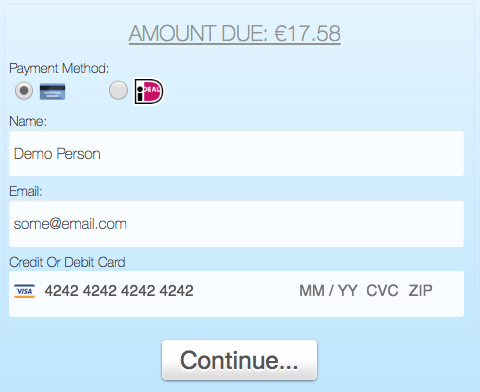
Version 2.0 of the Stripe Add-on allows customers to make payments using various funding sources in addition to credit cards or debit cards. These include iDEAL, Sofort & Giropay, popular in some European countries. These are known as ‘sources’ by Stripe.
Jun 8, 2018 (updated: June 7, 2018) | Add-Ons
The Electronic Funds Transfer (EFT) add-on will offer customers the option of paying via bank transfer. A button is displayed after the booking form is complete. When the admin ACCEPTS or sets the booking to PAID, custom messages as defined below are sent to the customer.
Jun 7, 2018 (updated: February 20, 2019) | Add-Ons
DPO Paygate (formerly known as VCS) provide payment processing solutions for South African markets. Ask us about our add-on plugin that allows customers to make online payments via DPO/VCS.
Jun 6, 2018 (updated: June 28, 2019) | Add-Ons, Cab Grid Pro Stripe Integration, Help and Support
This article describes each of the options available under the STRIPE tab in Cab Grid Pro. The Stripe tab is available when the Cab Grid Pro Stripe Integration add-on is installed and activated. Stripe provides a means for users to process online payments using credit cards (e.g. Visa or MasterCard or American Express), debit cards, or bank transfers (via iDEAL, GiroPay or SoFort).
May 25, 2018 (updated: May 25, 2018) | Booking Management, Cab Grid Free Basic Edition, Cab Grid Pro, Cab Grid Pro Stripe Integration, Help and Support
Cab Grid does not store any customer data. All booking data is sent to administrators via email for offline processing. If the Booking Management Add-on is installed & active, booking data is stored on the server and customer consent may be required. This article provides details.
May 4, 2018 (updated: September 23, 2018) | Booking Management, Cab Grid Pro, Cab Grid Pro Stripe Integration, Help and Support
Cab Grid Pro (version 4 and later), the Cab Grid Booking Management Add-on, and the Cab Grid Pro Stripe Integration Add-on include automatic updating. Updates will be available via WordPress’s built-in update mechanism and administrators should be notified in...
May 3, 2018 (updated: September 24, 2018) | Cab Grid Free Basic Edition, Cab Grid Pro, Help and Support, Troubleshooting
Cab Grid has a built in compatibility test. This test can show incompatibility between the hosting environment and Cab Grid Pro. It accessible from the BASIC edition of Cab Grid and from Cab Grid Pro v4 or higher.
Apr 23, 2018 (updated: February 12, 2023) | Add-Ons, Cab Grid Pro, Help and Support
Download the free Defaults add-on plugin for WordPress to configure advanced Cab Grid Pro taxi price calculator settings independently of the main plugin. Update button and form field labels, set min & max passenger or time periods, set price decimals & formatting, and more…
Apr 7, 2018 (updated: August 31, 2020) | Add-Ons, Booking Management, Help and Support
Version 2 of our taxi booking management system provides a calendar view with daily itinerary, functionality to add, edit & duplicate bookings from the admin, checking for timing conflicts with other bookings, and customisable messaging for actions such as accept, decline, cancel or paid.



![Display a fare price table using [cabGridProTable] shortcode](https://cabgrid.com/wp-content/uploads/2018/09/xcab-grid-pro-table-layout.jpg.pagespeed.ic.uUO_BlnETd.jpg)