
Auto-enter return prices
When the ‘Automatically update empty corresponding [return] prices as you type?’ box is ticked, the corresponding return (or opposite direction) price will be entered in the pricing table

When the ‘Automatically update empty corresponding [return] prices as you type?’ box is ticked, the corresponding return (or opposite direction) price will be entered in the pricing table


Common CabGrid CSS styling problems and how to use a web browser Inspector to troubleshoot layout or appearance issues. e.g. Button text not visible or elements overlapping.

This article describes the two widgets provided for your sidebar in CabGrid Pro.

Cab Grid Pro version 3 offers address auto-complete on the taxi booking form via the Google Maps JavaScript API. This article describes how to find or generate your API key.

How to provide a means for visitors to get prices for taxi journeys between locations you do not list using Cab Grid. This article describes using an ‘-other’ location and a link to a custom taxi price quote request form with Cab Grid.
Version 3 of our taxi price calculator and booking plugin for WordPress is now available. This article details new features in the version 3 release.

Responding quickly to taxi booking requests can avoid lost cab bookings. This article describes how to manage booking requests sent via the CabGrid Pro plugin for WordPress.
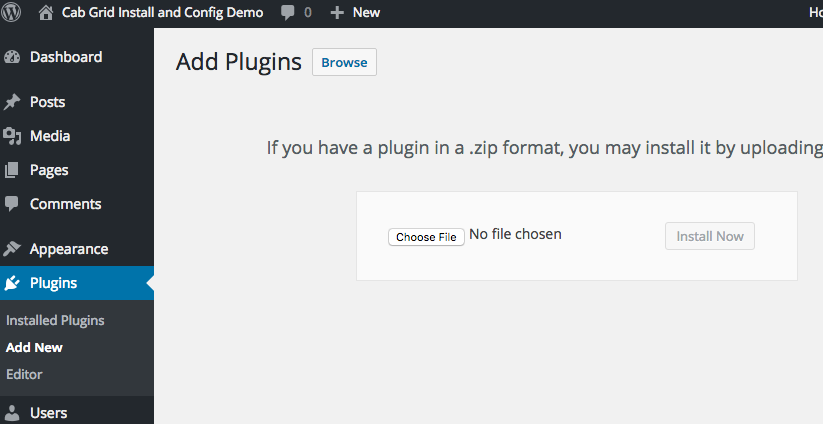
New versions of Cab Grid Pro taxi booking plugin for WordPress are distributed to license holders who must upload new files to their website. This can be done via FTP upload to the WordPress plugins directory or via the WordPress admin. This article describes how to use either method to update (upgrade) Cab Grid Pro to the latest version.

CabGrid Pro’s shortcode supports attributes that can adjust the appearance and functionality of each instance of CabGrid on your website. This article discusses what shortcode attribute are available and how to implement them (Layout/ID/Icons/Luggage/Pre-defined).

We are looking for help translating Cab Grid into other languages. Please use the form on this page to get in touch if this is something you can do.

Segment destinations by assigning them to groups, then display a version of Cab Grid for each group. This feature allows many instances of the Cab Grid plugin to be displayed on a single web page, each with a different purpose. For example, one for airport transfers, one for school runs, and one for suburban routes. This article describes how to use the Groups feature of the Cab Grid Pro plugin for WordPress.

How to change the appearance of the Cab Grid fare price calculator using custom CSS styling. Custom styles cab be added under the OPTIONS tab.

Cab Grid Pro provides an online booking form that is displayed (optionally) after a price is calculated. This form contains a set of standard fields, but custom fields can be added to augment and personalise the booking form. Values entered in these form fields are included with the booking notification email.

We’re delighted to announce the availability of Cab Grid Pro version 2. This update includes several new features and under the hood enhancements. This article discusses these new features and enhancements.

How to configure the ORIGIN and DESTINATION options for areas in the Cab Grid Pro taxi price calculator plugin for WordPress.
How to configure price variations in the Cab Grid Pro taxi price calculator plugin for WordPress. Add up to two separate price calculations applied to your main price at the click of a button.

Video tutorial showing installing the plugin from the WordPress plugin directory, activating the Cab Grid plugin, configuring the currency symbol and changing messages, adding areas and specifying prices, and publishing the taxi price calculator on your WordPress website

Video tutorial showing installing and configuring the initial version (v1) of the Cab Grid Pro price calculator and taxi booking plugin for WordPress.
Video tutorial showing installing the plugin from the WordPress plugin directory, activating the Cab Grid plugin, configuring the currency symbol and changing messages, adding areas and specifying prices, and publishing the taxi price calculator on your WordPress website


