
Styling Demos
The following examples show how the appearance of the Cab Grid price calculator can be changed using CSS styling. These examples make use of the Cab Grid Pro shortcode’s class attribute enabling each to be targeted and styled independently.
Custom CSS code can be entered in the ‘CSS Styling‘ box under the OPTIONS tab on the Cab Grid page of a site’s WordPress admin. For more information on adding custom styling to your taxi fare price calculator, see our support article: How to customise your price calculator’s appearance with CSS and check out the Custom Style Builder.
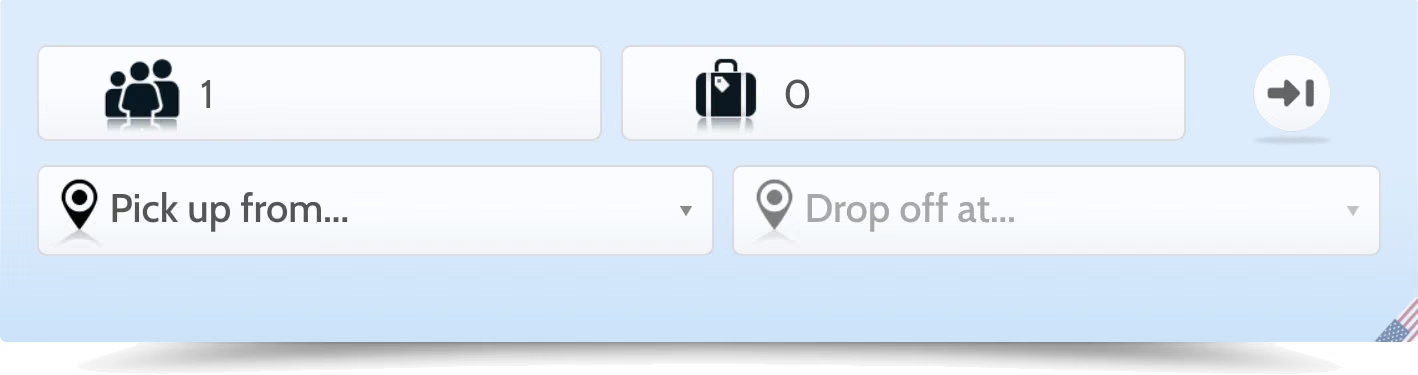
Above is a full-width styling example.
To create this, the Cab Grid shortcode is given a CLASS attribute: v5-fullWidth.
From here we can specifically target this instance of the Cab Grid Pro plugin and apply dedicated styles….
Shortcode syntax:
[cabGridPro icons="light" class="v5-fullWidth"]
Custom CSS (entered in CabGrid Pro Options tab):
.cabGridPro.v5-fullWidth {background:transparent;}
.cabGridPro.v5-fullWidth:after {display:none;}
Need a Hand?
Vehicle Layout
This demo shows the vehicle select option with a transparent background over a full width image. The background image is specified by the parent element (part of the WordPress theme).
CSS Syntax
The Cab Grid shortcode is assigned a CLASS attribute as ‘v5-transVehicle’
.cabGridPro.v5-transVehicle {background:transparent;}

.cabGridPro.v5-transVehicle:after {background:none;}

.cabGridPro.v5-transVehicle .cabGridForm ul.cabGridProJourneyDetails li.cabGridProVehicles ul>li {border-color: #8e8e8e;background: rgba(72, 72, 72, 0.64);background: linear-gradient(to right, rgba(0, 0, 0, 0.15) 0%,rgba(36,36,36,0.5) 20%,rgba(41, 41, 41, 0.8) 50%,rgba(36,36,36,0.5) 80%,rgba(0, 0, 0, 0.15) 100%);box-shadow: 0px 0px 4px rgba(255, 255, 255, 0.39);}

.cabGridPro.v5-transVehicle .cabGridForm ul.cabGridProJourneyDetails li.cabGridProVehicles ul>li label span.cabGridProVehicleImgCont {background: rgba(0,0,0,0.3);background: linear-gradient(to bottom, rgba(0,0,0,0) 0%,rgba(0,0,0,0.5) 15%,rgba(0,0,0,0.65) 50%,rgba(0,0,0,0.5) 85%,rgba(0,0,0,0) 100%);}

.cabGridPro.v5-transVehicle .cabGridForm ul.cabGridProJourneyDetails li.cabGridProFromSelect .cabGridProPickSelect, .cabGridPro.v5-transVehicle .cabGridForm ul.cabGridProJourneyDetails li.cabGridProToSelect .cabGridProDropSelect {background: rgba(31, 31, 31, 0.62);}

.cabGridPro.v5-transVehicle .cabGridProPrice .cabGridProPriceDigCont,.cabGridPro.v5-transVehicle form ul.cabGridProBookDetails {background: rgba(31,31,31,0.7);border-radius: 8px;border: 1px solid #8e8e8e;padding: 20px !important; width: calc(100% - 40px);margin: 0 auto 20px;}
Shortcode syntax:
[cabGridPro layout="vehicle" class="v5-transVehicle"]
Shortcode syntax:
[cabGridPro icons="light" class="v5-GreenSquared"]
CSS:
.cabGridPro.v5-GreenSquared {color: #f7f7f7;background: rgb(118,173,61);border-radius: 0px;border-bottom: 10px solid rgb(109, 214, 90);box-shadow: 0px 0px 20px rgba(31, 31, 31, 0.14);}

.cabGridPro.v5-GreenSquared:after {display:none;}

.cabGridPro.v5-GreenSquared .cabGridProBookDetails input:not([type=submit]), .cabGridPro.v5-GreenSquared .cabGridProBookDetails textarea, .cabGridPro.v5-GreenSquared li.cabGridProChosenLI, .cabGridPro.v5-GreenSquared li.cabGridProLuggage, .cabGridPro.v5-GreenSquared li.cabGridProLuggageOn, .cabGridPro.v5-GreenSquared li.cabGridProPassengers, .cabGridPro.v5-GreenSquared li.cabGridProTickets, .cabGridPro.v5-GreenSquared li.cabGridProTime, .cabGridPro.v5-GreenSquared li.cabGridProVehicles ul>li, .cabGridPro.v5-GreenSquared.cgpMobileN .cgpCont-telephone {background: transparent;border: 1px solid #6dd65a;border-radius: 0;}
Green Squared Layout
The Cab Grid shortcode is assigned a CLASS attribute: ‘v5-GreenSquared‘. Any instance of the Cab Grid taxi price calculator with this class assigned will acquire this styling.
“Transfers” Theme Layout
Another full width demo with some slightly different features, includes hiding the luggage box and replacing the return icon with a custom tick-box.
Shortcode syntax:
[cabGridPro class="cgp-Transfers"]
Custom CSS (entered in CabGrid Pro Options tab)
/*TRANSFERS v5*/
.cabGridPro.v5-Transfers * {font-size:17px;}
.cabGridPro.v5-Transfers {background:transparent;color:#fff !important;text-transform:uppercase !important;font-size:16px;max-width: 1370px !important;width:100% !important;margin: 0 auto;padding: 5px;min-height: 300px;}
.cabGridPro.v5-Transfers:after,.cabGridPro.v5-Transfers .tooltip {display: none;}
.cabGridPro.v5-Transfers h1 {color:#fff !important;border: none; border-radius: 0;background-color: transparent;box-shadow: none;text-shadow: 0px 0px 1px #7d7d7d;margin:0;padding:0;}
/*Hide Luggage*/
.cabGridPro.v5-Transfers form ul.cabGridProJourneyDetails li.cabGridProLuggage,.cabGridPro.v5-Transfers form ul.cabGridProJourneyDetails li.cabGridProSwapDests,.cabGridPro.v5-Transfers .cabGridProFlagCont {display:none !important;}
/*Journey Details General*/
.cabGridPro.v5-Transfers.cabGridProWide form.cabGridForm {margin-bottom:70px;}
.cabGridPro.v5-Transfers .cabGridForm ul.cabGridProJourneyDetails { align-items: stretch; }
.cabGridPro.v5-Transfers form ul.cabGridProJourneyDetails > li {background-color: transparent;background: transparent;border: none;margin: 0 0.5em;padding: 0;}
.cabGridPro.v5-Transfers form ul.cabGridProJourneyDetails > li label {text-indent:0 !important;background-image:none !important;text-transform:uppercase !important;display:block !important;float:none !important;font-size:18px !important;padding: 0 1px 0 3px !important;text-align: left;margin: 0 !important;color:#fff;line-height: 1;height:auto;}
.cabGridPro.v5-Transfers .cabGridForm ul.cabGridProJourneyDetails>li>input, .cabGridPro.v5-Transfers .cabGridForm ul.cabGridProJourneyDetails>li>input[type=number] {display: block;height:47px;line-height:47px;padding: 0 12px;font-size: 15px;width: 100%;border: 1px solid #DFDFD0;color: #191F26;border-radius: 3px;background-image:none;background-color:#fff;}
/*Return Box*/
.cabGridPro.v5-Transfers form ul.cabGridProJourneyDetails li.cabGridProRtnSelect {width:12%;height:auto;color:#fff;background-image:none;min-height:70px;position:relative;min-width:95px;max-width:125px;}
.cabGridPro.v5-Transfers form ul.cabGridProJourneyDetails li.cabGridProRtnSelect.cabGridProRtnIcon {background-image:none !important;}
.cabGridPro.v5-Transfers form ul.cabGridProJourneyDetails li.cabGridProRtnSelect label {border:none;min-width:80px;text-indent:0;}
.cabGridPro.v5-Transfers form ul.cabGridProJourneyDetails li.cabGridProRtnSelect input {padding:0;margin:0;width:auto;height:auto;display:none;}
.cabGridPro.v5-Transfers form ul.cabGridProJourneyDetails li.cabGridProRtnSelect label:after {text-indent:0px;position: absolute;content:'\002714';display:block;width:calc(100% - 0.5em);height:45px;line-height:45px;background-color:#fff;margin:0;padding:0;text-align: center;font-size:18px;border-radius: 3px;border: 1px solid #DFDFD0;}
.cabGridPro.v5-Transfers form ul.cabGridProJourneyDetails li.cabGridProRtnSelect.cabGridProRtnIcon label:after {color: #000;}
/*TO/FROM boxes (general)*/
.cabGridPro.v5-Transfers .chosen-container-single .chosen-single {border-radius: 3px;background-color:#fff;text-transform:uppercase;box-shadow: none;padding:14px 0 14px 38px;margin:0;}
.cabGridPro.v5-Transfers .chosen-container .chosen-drop {box-shadow:none;}
.cabGridPro.v5-Transfers form ul.cabGridProJourneyDetails li input.chosen-search-input  {height:auto;padding:4px;line-height:1.2;}
.cabGridPro.v5-Transfers .cabGridProJourneyDetails .chosen-container .chosen-results li.group-result {padding-right: 13px!important; text-align: right; background: rgba(20,5,45,0.95);color: #fff; text-transform: uppercase;}
.cabGridPro.v5-Transfers.cgpMobileY .cabGridForm ul.cabGridProJourneyDetails li.cabGridProChosenLI {width:100%;}
/*FROM box*/
.cabGridPro.v5-Transfers form ul.cabGridProJourneyDetails li.cabGridProFromSelect {width:30%;max-width:358px;min-width:120px;}
/*FROM box*/
.cabGridPro.v5-Transfers form ul.cabGridProJourneyDetails li.cabGridProToSelect {width:30%;max-width:358px;min-width:120px;}
/*PRICE*/
.cabGridPro.v5-Transfers .cabGridProPrice,.cabGridPro.v5-Transfers .cabGridProPrice * {color:#fff;}
.cabGridPro.v5-Transfers .cabGridProMessage,.cabGridPro.v5-Transfers .cabGridProPriceDigCont .cabGridProRtnMsg {color:#fff;}
.cabGridPro.v5-Transfers form ul li input[type="submit"],.cabGridPro.v5-Transfers .cabGridProPrice .cabGridProBookButton,.cabGridPro.v5-Transfers .cabGridProPayButton {font-size:18px !important;font-weight:bold;box-shadow:none;border: none;text-transform: uppercase;-webkit-border-radius: 3px;-moz-border-radius: 3px;border-radius: 3px;color: #fff !important;text-align: center;background: #191F26 !important;height: 54px;line-height: 54px;padding: 0 14px !important;text-shadow: none;transition:all 0.8s ease;}
.cabGridPro.v5-Transfers form ul li input[type="submit"]:hover,.cabGridPro.v5-Transfers .cabGridProPrice .cabGridProBookButton:hover,.cabGridPro.v5-Transfers .cabGridProPayButton:hover {background:#fff !important;color:#191F26 !important;}
/*PRICE VARIATION*/
.cabGridPro.v5-Transfers.cabGridProWide .cabGridVariation {position: absolute;top: 80px;padding: 0 20%;}
.cabGridPro.v5-Transfers.cabGridProWide .cabGridVariation a {margin: 0.5em;border-radius: 4px;background: #fff !important;color: #4e4e4e;}
.cabGridPro.v5-Transfers.cabGridProWide .cabGridVariation a.active {color:#1d1d1d;box-shadow: inset 2px 2px 3px 1px rgba(0, 0, 0, 0.33);text-shadow: 0px 1px 1px rgba(80, 77, 77, 0.23);}
.cabGridPro.v5-Transfers.cgpMobileY .cabGridVariation {margin-bottom:20px;}
.cabGridPro.v5-Transfers.cgpMobileY .cabGridVariation a {margin: 0.5em;border-radius: 4px;padding: 14px 0;min-width: 27%;font-size: 12px;}
/*BOOKING FORM*/
.cabGridPro.v5-Transfers form ul.cabGridProBookDetails {color:#fff;border:none;margin:2% auto;max-width:992px;background: -moz-radial-gradient(center, ellipse cover, rgba(0,0,0,0.18) 0%, rgba(3,3,3,0.18) 1%, rgba(39,39,39,0.15) 15%, rgba(166,166,166,0) 65%, rgba(255,255,255,0) 100%);background: -webkit-radial-gradient(center, ellipse cover, rgba(0,0,0,0.18) 0%,rgba(3,3,3,0.18) 1%,rgba(39,39,39,0.15) 15%,rgba(166,166,166,0) 65%,rgba(255,255,255,0) 100%);background: radial-gradient(ellipse at center, rgba(0,0,0,0.18) 0%,rgba(3,3,3,0.18) 1%,rgba(39,39,39,0.15) 15%,rgba(166,166,166,0) 65%,rgba(255,255,255,0) 100%);filter: progid:DXImageTransform.Microsoft.gradient( startColorstr='#2e000000', endColorstr='#00ffffff',GradientType=1 );}
.cabGridPro.v5-Transfers form ul.cabGridProBookDetails li label, .cabGridPro.v5-Transfers form ul.cabGridProBookDetails legend {color:#fff;}
.cabGridPro.v5-Transfers form ul.cabGridProBookDetails .cgpCont-telephone {background:#fff;}
.cabGridPro.v5-Transfers form ul.cabGridProBookDetails li textarea, .cabGridPro.v5-Transfers form ul.cabGridProBookDetails li input {background:#fff;border-radius:4px;height:auto;font-size:inherit;}
.cabGridPro.v5-Transfers form ul.cabGridProBookDetails li input {padding: 14px 0 14px 8px;}
.cabGridPro.v5-Transfers form ul.cabGridProBookDetails li label {text-transform:uppercase;}
/*EXTRAS*/
.cabGridPro.v5-Transfers .cabGridProExtras * {color:#fff;}
.cabGridPro.v5-Transfers .cabGridForm ul.cabGridProBookDetails li.cabGridProExtras ul>li input.cabGridProExtraQuantity {background: transparent;font-size: 32px;background-color: transparent;padding: 0px 0 0 18px;margin: 0;border: none;width: 54px;text-align: center;}
/*Off*/
.cabGridPro.v5-Transfers form ul.cabGridProJourneyDetails li.cabGridProOff {display:none;}
Sunset Layout
The Cab Grid shortcode is assigned a class named, ‘v5-sunset‘
CSS
/*SUNSET v5*/

.cabGridPro.v5-sunset * {color:red;}

.cabGridPro.v5-sunset fieldset,.cabGridPro.v5-sunset .cabGridForm ul.cabGridProBookDetails li.cabGridProExtras ul>li,.cabGridPro.v5-sunset .cabGridForm ul.cabGridProBookDetails li.cabGridProExtras ul>li h3 {border-color: red;}

.cabGridPro.v5-sunset ::placeholder {color:#ffe000;font-style: italic;}

.cabGridPro.v5-sunset,.cabGridPro.v5-sunset .chosen-container-single .chosen-drop {font-family:Calabri,Verdana,"Helvetica Neue",Trebuchet,"Trebuchet MS",Helvetica,Arial,sans-serif;box-shadow:1px 0px 2px rgba(0,0,0,0.2);padding-bottom:40px;border-radius: 10px;background: #f9d241;background: -moz-linear-gradient(top, #f9d241 0%, #f5b62d 100%);background: -webkit-linear-gradient(top, #f9d241 0%,#f5b62d 100%);background: linear-gradient(to bottom, #f9d241 0%,#f5b62d 100%);filter: progid:DXImageTransform.Microsoft.gradient( startColorstr='#f9d241', endColorstr='#f5b62d',GradientType=0 );color: #ff7600;}

.cabGridPro.v5-sunset .chosen-container .chosen-results::-webkit-scrollbar {width: 8px;}

.cabGridPro.v5-sunset .chosen-container .chosen-results::-webkit-scrollbar-track {border-radius: 10px;background-color:transparent;box-shadow:none;}

.cabGridPro.v5-sunset .chosen-container .chosen-results::-webkit-scrollbar-thumb {border-radius: 10px;background-color:rgba(0,0,255,0.5);}

.cabGridPro.v5-sunset .chosen-container .chosen-results li {color:red;}

.cabGridPro.v5-sunset .chosen-container-single .chosen-single span,.cabGridPro.v5-sunset .cabGridForm ul.cabGridProJourneyDetails>li>input {color:red;}

.cabGridPro.v5-sunset .cabGridProSwapDests {display:none !important;}

.cabGridPro.v5-sunset .cabGridProFlagCont {width: 100%;perspective: none;justify-content: center;overflow: visible;bottom:8px;}

.cabGridPro.v5-sunset .cabGridProFlagCont span,.cabGridPro.v5-sunset .cabGridProFlagCont span.flag-selected {display: inline-block;transform: none;box-shadow: 2px -1px 3px 0px rgba(0, 0, 0, 0.25);height: 16px;line-height: 23px;max-width: 24px;opacity: 0.5;width: auto;min-width: 24px;transition: opacity 3s ease;}

.cabGridPro.v5-sunset .cabGridProFlagCont span:hover {opacity:1;}

.cabGridPro.v5-sunset .cabGridProFlagCont span.flag-selected {box-shadow:none;}

.cabGridPro.v5-sunset .cabGridProFlagCont .tooltip {display:none !important;}

.cabGridPro.v5-sunset:after {display:none;}

.cabGridPro.v5-sunset form ul.cabGridProBookDetails>li label,.cabGridPro.v5-sunset .cabGridForm ul.cabGridProJourneyDetails>li>label {text-indent: 0;background-image: none;display: block;font-size: 14px;text-transform: uppercase;color: #ff7600;text-shadow: 0px -2px 3px rgba(255, 247, 0, 0.46);padding: 0;margin: 0;border-bottom: 1px solid #ffed10;border-radius: 0;}

.cabGridPro.v5-sunset .cabGridForm ul.cabGridProJourneyDetails li.cabGridProSwapDests, .cabGridPro.v5-sunset .cabGridProBookDetails input:not([type=submit]), .cabGridPro.v5-sunset .cabGridProBookDetails select, .cabGridPro.v5-sunset .cabGridProBookDetails textarea, .cabGridPro.v5-sunset li.cabGridProChosenLI, .cabGridPro.v5-sunset li.cabGridProLuggage, .cabGridPro.v5-sunset li.cabGridProLuggageOn, .cabGridPro.v5-sunset li.cabGridProPassengers, .cabGridPro.v5-sunset li.cabGridProTickets, .cabGridPro.v5-sunset li.cabGridProTime, .cabGridPro.v5-sunset li.cabGridProVehicles ul>li, .cabGridPro.v5-sunset.cgpMobileN .cgpCont-telephone {background:transparent;border:none;}

.cabGridPro.v5-sunset .cabGridForm ul.cabGridProJourneyDetails li.cabGridProRtnSelect {flex-basis: auto;padding: 0 !important;margin: -20px 0 0;background-color: transparent;border: none;border-radius: 0;box-shadow: none;background: transparent;}

.cabGridPro.v5-sunset .cabGridForm ul.cabGridProJourneyDetails li.cabGridProRtnSelect.cabGridProRtnIcon {box-shadow: none;}

.cabGridPro.v5-sunset .cabGridForm ul.cabGridProJourneyDetails li.cabGridProRtnSelect.cabGridProRtnIcon label {transform: rotate(32deg);}

.cabGridPro.v5-sunset .cabGridForm ul.cabGridProJourneyDetails li.cabGridProRtnSelect label {background-image: none !important;font-size: 14px !important;line-height: 1.45 !important;margin: 0;text-align: center;padding: 0.4em 0 !important;cursor: ew-resize;min-width: 72px;text-indent: 0;white-space: nowrap;text-transform: uppercase;transform: rotate(-32deg);border: 1px solid #ffed10;border-radius: 20px;transition: transform 1s cubic-bezier(0.72, -0.35, 0.07, 1.65);    background: #ff6409;color: #fff;}

.cabGridPro.v5-sunset .cabGridProBookDetails input[type=datetime-local], .cabGridPro.v5-sunset .cabGridProBookDetails input[type=email], .cabGridPro.v5-sunset .cabGridProBookDetails input[type=text], .cabGridPro.v5-sunset .cabGridProBookDetails select, .cabGridPro.v5-sunset .cabGridProBookDetails textarea {color:#8f83d0;}

.cabGridPro.v5-sunset .cabGridProBookDetails input[type=datetime-local]:focus, .cabGridPro.v5-sunset .cabGridProBookDetails input[type=email]:focus, .cabGridPro.v5-sunset .cabGridProBookDetails input[type=text]:focus, .cabGridPro.v5-sunset .cabGridProBookDetails select:focus, .cabGridPro.v5-sunset .cabGridProBookDetails textarea:focus {border-bottom: 2px solid rgba(255, 160, 92, 0.59);border-radius:0;    box-shadow: inset 0px -14px 14px rgba(234, 230, 77, 0.77);}

.cabGridPro.v5-sunset.cgpMobileY {padding:20px;}

.cabGridPro.v5-sunset.cgpMobileY .cabGridProFlagCont {display:none;}

.cabGridPro.v5-sunset.cgpMobileY .cabGridForm ul.cabGridProJourneyDetails li.cabGridProRtnSelect label {position: absolute;background: red;color: #fff;top: 0;right: -24px;width: 90px;transform: rotate(32deg);}

.cabGridPro.v5-sunset.cgpMobileY form ul.cabGridProBookDetails>li label, .cabGridPro.v5-sunset.cgpMobileY .cabGridForm ul.cabGridProJourneyDetails>li>label {font-size:18px;}

.cabGridPro.v5-sunset.cgpMobileY .cabGridForm ul.cabGridProJourneyDetails>li>input {font-size: 30px;text-align: center;font-weight: bold;}
This orange and red coloured theme uses displays text labels for the taxi journey input fields.
Shortcode syntax:
[cabGridPro class="v5-sunset"]
We can write your custom CSS
Clean/Plain Layout
The Cab Grid shortcode is assigned a class, ‘v5-clean’
CSS
.cabGridPro.v5-clean {background:transparent;}

.cabGridPro.v5-clean:after,.cabGridPro.v5-clean .cabGridProFlagCont {display:none;}
Shortcode syntax:
[cabGridPro class="v5-clean"]
Visit on desktop computer to view this demo…
Square Layout
This is a fixed width layout with a square style. It is targeted at desktop devices only using the cgpMobileN CSS class. On mobile, the standard responsive layout will load.
The shortcode would look like this:
[cabGridPro class="v5-square"]
The CSS…
.cabGridPro.cgpMobileN.v5-square {width:430px;background:#f5f5f5;border-radius:none;box-shadow:none;border-radius:0;padding:24px;font-size:16px;}

.cabGridPro.cgpMobileN.v5-square:after {display:none;}

.cabGridPro.cgpMobileN.v5-square .la-ball-fussion {color: #00005c;}

.cabGridPro.cgpMobileN.v5-square .cabGridForm ul.cabGridProJourneyDetails>li {width:100%;max-width:100%;}

.cabGridPro.cgpMobileN.v5-square .cabGridForm ul.cabGridProJourneyDetails>li>label {padding-right:10%;}

.cabGridPro.cgpMobileN.v5-square .cabGridVariation {margin: 0 0 3px;padding: 0;height: 42px;}

.cabGridPro.cgpMobileN.v5-square .cabGridVariation a {width: 122px;padding:6px 0;border-radius:0 !important;background:#fff;line-height: 30px;height: 40px;color:#444;border-color: #ddd;}

.cabGridPro.cgpMobileN.v5-square .cabGridVariation a:active,.cabGridPro.cgpMobileN.v5-square .cabGridVariation a:focus,.cabGridPro.cgpMobileN.v5-square .cabGridVariation a.active {background:#fafafa;color:#000;font-size: 75%;}

.cabGridPro.cgpMobileN.v5-square .cabGridProJourneyDetails li.cabGridProRtnSelect {background-position: 12px center !important;background-size: 32px;background-image: url(/wp-content/plugins/cab-grid-pro/i/one-way-icon2.avif);background-repeat:no-repeat;max-width:100%;background-color: #fff;border: 1px solid #ddd;}

.cabGridPro.cgpMobileN.v5-square .cabGridProJourneyDetails li.cabGridProRtnSelect.cabGridProRtnIcon {}

.cabGridPro.cgpMobileN.v5-square .cabGridProJourneyDetails li.cabGridProRtnSelect label {height:auto !important;float:none !important;text-indent: 0 !important;background-image: none !important;display: block !important;line-height: 32px !important;text-transform: uppercase;text-align: center;cursor:ew-resize;min-width:49px;margin:0 !important;border:none;padding:0 22px 0 0!important;font-size: 15px !important;}
Latest CabGrid Pro support articles

CabGrid Pro 6 Licensing Guide
How do I find my license code? You can find and manage your CabGrid Pro licenses on your CabGrid account page. This includes your Licensed Email Address and Plan ID. My Licenses CabGrid v5 user? You can continue to use CabGrid version 5 and earlier on your site….

How to send a payment link with the booking acknowledgement message
Want to include a payment link in the booking acknowledgement email. There are number of ways you can construct a payment link and include it in the acknowledgement email. Here’s a couple of suggestions…
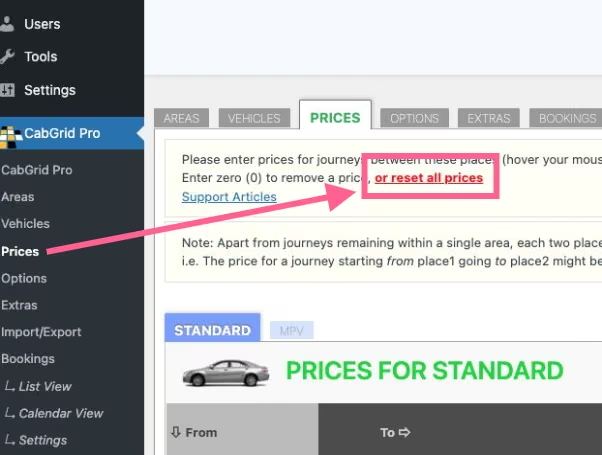
Reset all prices, places, vehicle or extras with one click
CabGrid Pro version 5.9.4 adds an option to reset all prices, places, vehicles and extras with one click.

Require Payment After Taxi Booking Submitted
Want to make payment mandatory when a customer submits a taxi booking request in CabGrid Pro? This is something occasionally requested by our users. Unfortunately, this is not directly possible. However, we have some suggestions…

Airport meet and greet name plate print out with your logo
The Nameplate feature is part of the CabGrid Booking Management Add-on. The NAMEPLATE button is located in the MANAGE column next to each booking. If the CabGrid Driver add-on is installed, a driver will receive a link to the nameplate page for that booking when…
Logo Image
The logo field in options allows a company logo to be specified. This is to be used in default/generic emails and other places across the system – such as the airport greeting card.

Booking Reference Seed
The Booking Reference Seed option allows you to define or adjust the booking reference assigned when a booking is requested.
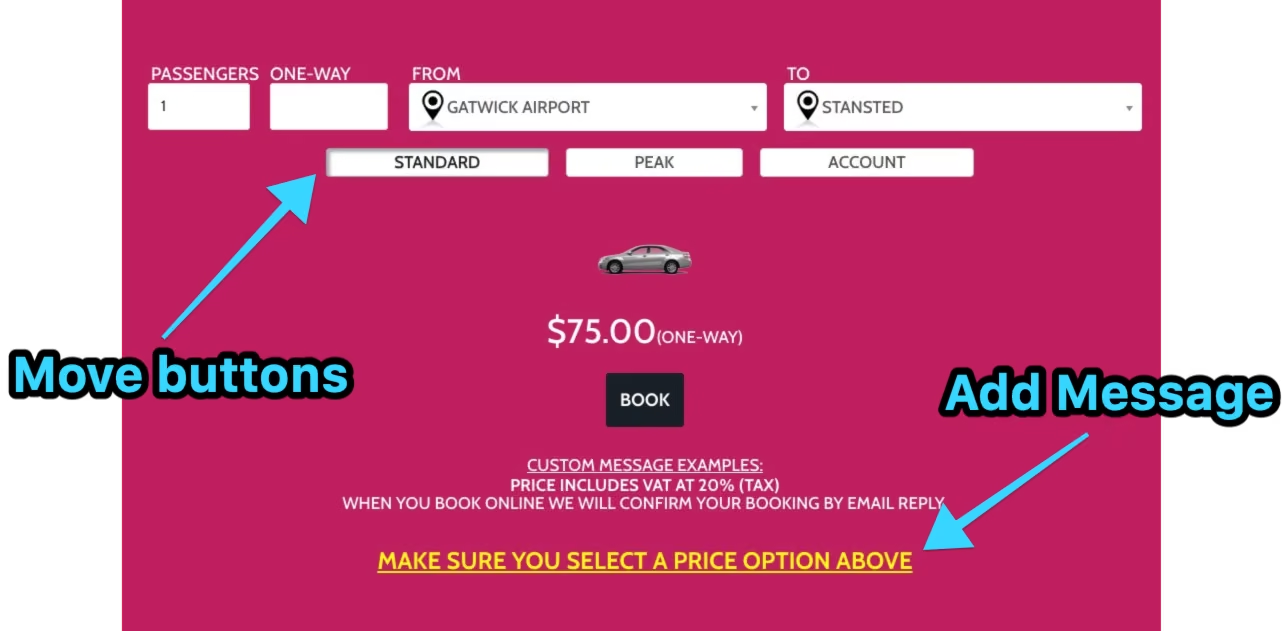
Highlighting Price Variation Options
Whilst CabGrid cannot currently automatically update the price based on booking form input, we have some recommendations for drawing your customer’s attention to the price variation buttons…
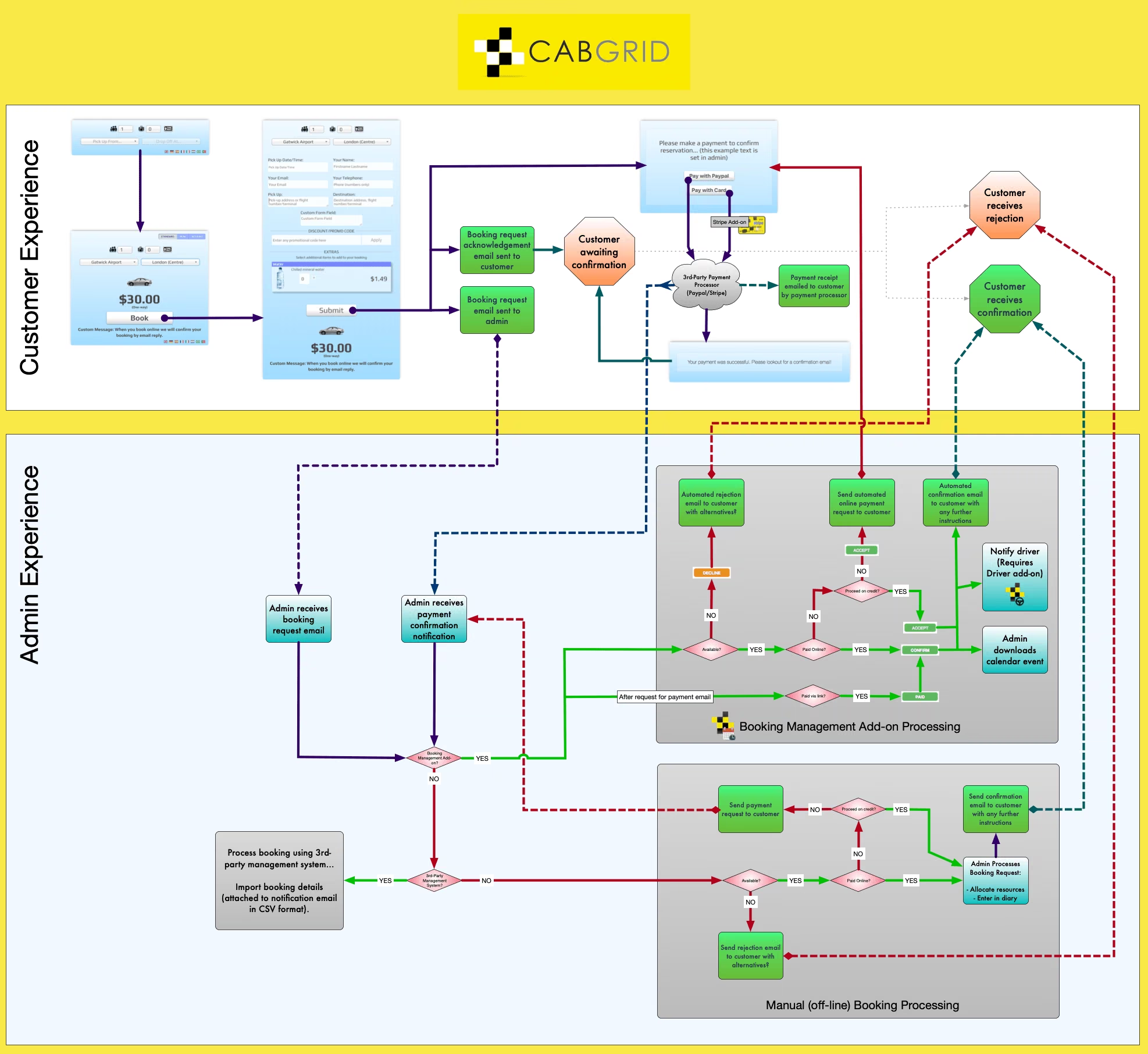
Automatically Accept CabGrid Booking Requests
The Booking Management add-on cannot automatically accept or confirm bookings. However, it is possible to give this illusion to your customer by re-wording the email and messages shown during the booking process…
Add your logo to taxi booking notification emails
How to add a logo or image to notification emails sent from CabGrid Pro or the CabGrid Booking Management add-on

Invoicing, Accounting and Bookkeeping with CabGrid
CabGrid features to help with accounting, bookkeeping and invoicing customers.

Booking form unexpectedly shows mandatory information missing
Problem: when trying to summit a booking, the message “Mandatory information missing or invalid. Invalid fields have been highlighted.” always appears, even when all required fields are completed.